
Migrata CLI v0.6.0: Custom SQL Parser and Always-Safe Column Type Casting
 Nathan Ortega
I'm excited to announce the next release of the Migrata CLI. This release focuses on two foundational areas that everything else depends on: how Migrata understands your SQL and how it handles column type changes.
What's New in v0.6.0#
Custom SQL Parser#
Until now, Migrata relied on a third-party SQL parser to read and understand your schema files. It worked for the basics, but had two recurring problems: it couldn't handle many edge-case SQL expressions, and when it did fail, the error messages didn't provide much context.
With v0.6.0, I've replaced that dependency with a custom SQL parser built specifically for the declarative migration workflow. The new parser supports a much wider range of expressions out of the box, and ships with clear, actionable error messages when it encounters something it can't parse.
Writing the parser in F# simplified the implementation considerably. The previous library was written in C# using classes, which meant comparing statement-level objects with .Equals() wasn't reliable: semantically identical expressions could still be different object instances. With F#'s structural equality built into records and lists, comparing entire syntax trees is a single = operator. No custom equality logic, and no more false mismatches. It also let me replace runtime type checks with exhaustive pattern matching over native F# types.
Parsing correctly is only part of the problem. The old third-party parser returned error strings, but it wasn't always obvious where the error was in our SQL. The new parser reports errors with precise source context. The formatter renders the surrounding SQL with a caret pointing directly at the problem, following the same pattern Rust and Elm popularized.

Before: a bare error with no source context
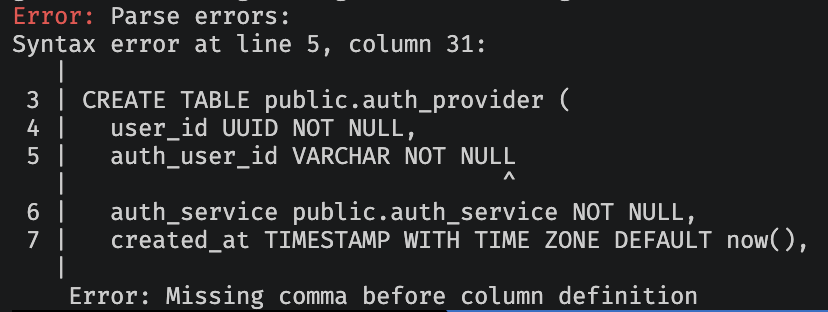
After: source snippet with caret and precise message
This custom parser also lays the groundwork for deeper integrations down the road. Now that we control the full parsing pipeline, we can build features that require a deeper semantic understanding of SQL structure.
Always-Safe Casting#
Column type changes have always been one of the riskiest operations in schema migrations. Changing a column's type can rewrite every row in the table, hold blocking locks, and in the worst case, silently transform data in unexpected ways.
The standard safe approach is a multi-step pattern: add a new column with the desired type, backfill the data, drop the old column, and rename the new one, all wrapped in an explicit transaction. But because it's verbose, many migration tools take the shortcut of issuing a bare ALTER COLUMN ... TYPE, an in-place conversion that can hold a long-lasting lock and force a full table rewrite without warning.
Safe behavior should be the default, not an opt-in flag. If you need an in-place ALTER COLUMN ... TYPE, you can always write a raw SQL migration file.
Here's what Migrata generates under the hood:
- Add a new column with the target data type alongside the existing column
- Update the new column with converted values, using a
USINGexpression generated from the old and new types - Drop the old column
- Rename the temporary column to the original column name
- Re-apply any constraints and indexes from the original column
The entire sequence is wrapped in a transaction, so if anything fails mid-way, the whole operation rolls back cleanly. The cast expression is computed by examining both the source and target data types structurally, choosing the most appropriate conversion strategy for each pair. When PostgreSQL's implicit casts are sufficient, Migrata uses them. When they aren't, it generates a more specific conversion expression. If a conversion can't be expressed safely, Migrata tells you exactly why.
Upgrading#
You can grab the latest version:
On macOS or Linux:
curl -fsSL https://migrata.io/install.sh | sh
On Windows (PowerShell):
irm https://migrata.io/install.ps1 | iex
For the full changelog and complete list of changes, check out the GitHub releases page.
Wrapping Up#
v0.6.0 focused on two themes: foundation and safety by default.
- Custom SQL parser - wider expression support with clear, actionable error messages, built specifically for the declarative migration workflow.
- Always-Safe casting - column type changes are performed using a transactional multi-step migration, eliminating risky in-place conversions.
We'd love to hear what you're building with Migrata and what pain points you'd like us to tackle next. Open an issue, start a discussion, or just say hello.
Happy migrating.