
Migrata CLI v0.4.0: Ephemeral DB Validation, Impact Analysis, and Table Partition Management
 Nathan Ortega
I'm excited to announce the release of Migrata CLI v0.4.0. This is a big step forward for the project, bringing several of the most anticipated capabilities to life.
What's New in v0.4.0#
Table Partition Management#
Partitioning is a first-class concern in v0.4.0. Both the inspect and diff commands correctly handle PARTITION BY clauses and individual partition definitions. If your live database uses partitioning, the inspected schema will reflect it, and the diff will account for it accurately.
You can define the desired partition layout alongside the rest of your schema, and Migrata will reconcile the live database to match — no manual DDL scripting required. This means partition operations can be versioned, reviewed, and safely applied across environments.
What's supported:
- Create partitions on an already-partitioned table - add new partitions based on the declared schema.
- Remove partitions - drop partitions that are no longer present in the declared schema.
- Rename partitions - reconcile partition names to match the declared schema.
These three operations (CREATE, UPDATE, DELETE) cover the vast majority of real-world partition management: adding new time-based ranges, retiring old data boundaries, and keeping names consistent across environments.
What's intentionally excluded:
- Table conversions - converting a non-partitioned table into a partitioned table (and vice versa) is not handled automatically.
This is a deliberate scope reduction. Converting a table's partitioning scheme requires moving existing data into a new physical layout, and the safest approach depends on your data volume, access patterns, and tolerance for downtime. There is no one-size-fits-all strategy. We believe these operations should be planned, tested, and executed manually - with full understanding of the data movement involved.
Our philosophy is simple: Migrata should automate what's safe and predictable, and get out of your way when human judgment is required.
Ephemeral DB Validation (`--dev-image`)#
Before applying a migration to a shared or production database, you want to test it against a clean environment. This is a highly anticipated feature that lets you validate schema changes without risk. In v0.4.0, you can pass the --dev-image flag to spin up an ephemeral PostgreSQL instance via Docker, apply the diff against it, and validate that everything runs without errors.
The --dev-image value uses the same syntax as a FROM clause in a Dockerfile. For example, "postgres:16" pulls the official PostgreSQL 16 image.
$ migrata diff \
    --from "postgresql://localhost:5432/mydb" \
    --to ./schema \
    --dev-image "postgres:16"
Migrata handles the full lifecycle: pulls the image if missing, starts the container, applies the migration, runs validation, and tears it down. If the migration fails in the dev database, it never touches production.
This is especially valuable for CI pipelines, where you want to catch issues before they reach a shared environment.
Impact Analysis#
The diff command now includes an impact analysis section that lists any downstream dependencies that would be broken by the migration. It scans for views, functions, and other objects that reference the tables or columns you're changing, and flags them alongside the query plan.
This highlights the important bits: you don't just see what changed, you see what else needs to be updated to keep everything working. If you're renaming a column, Migrata tells you which views and functions reference it so you can fix them before they break in production.
$ migrata diff \
    --from "postgresql://localhost:5432/mydb" \
    --to ./schema
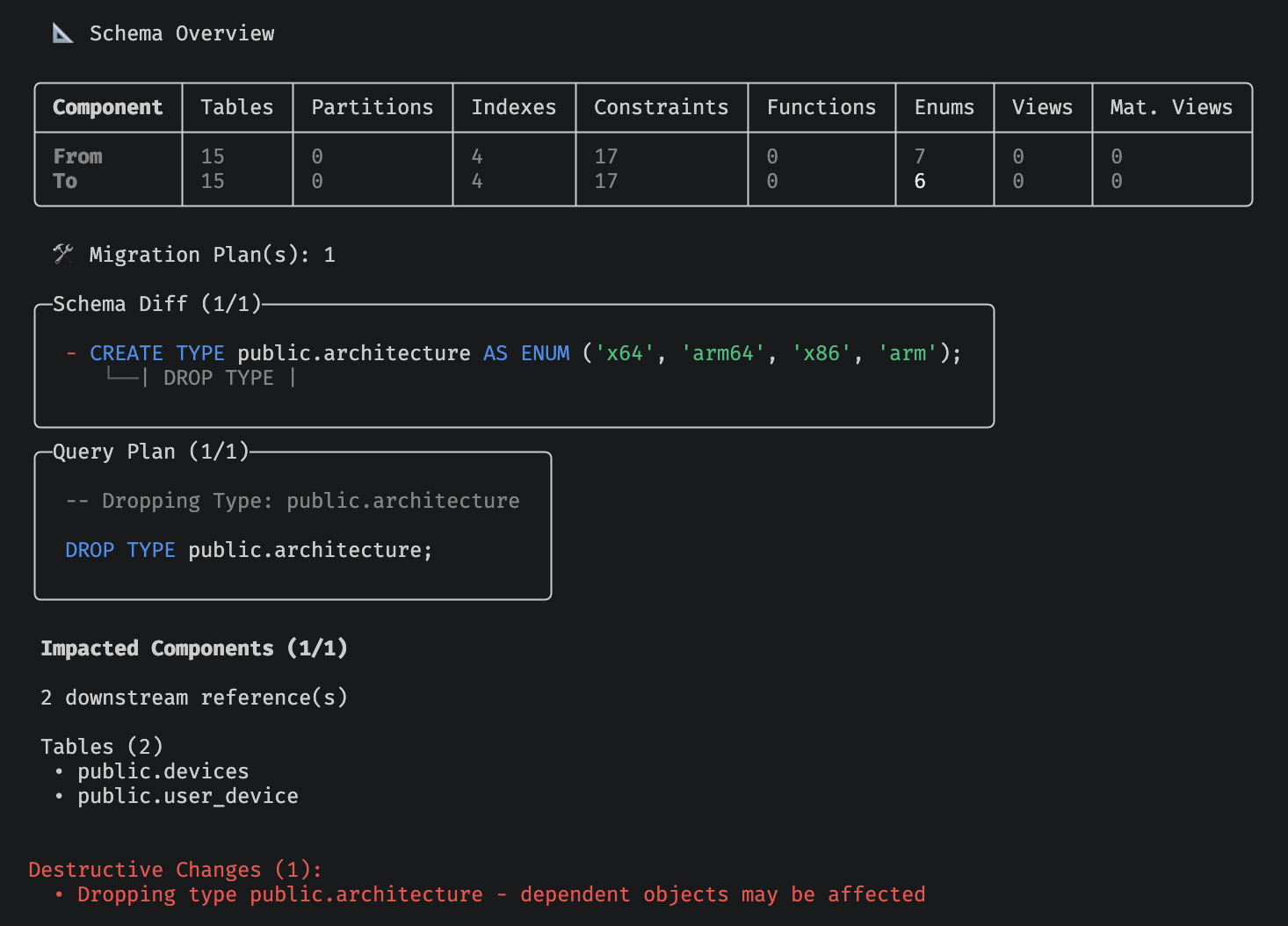
In the example above, we're seeing what happens when we drop an enum used by two other tables. The internal dependency graph counts the number of potentially breaking changes and groups them by type.
Advisory Locks for Safer Migrations#
Concurrent migration attempts, whether from CI pipelines, multiple developers, or automated tooling, can corrupt your migration state and leave your schema in an indeterminate state. Migrata v0.4.0 acquires a PostgreSQL advisory lock before running any migration and holds it for the duration of the operation.
If a second process tries to run a migration at the same time, it blocks until the first one completes. This prevents conflicts without requiring external coordination. No extra infrastructure. No table locks. Just a pg_try_advisory_lock under the hood.
If another process is already holding the lock, you'll see a clear message telling you to wait.
Streamlined Authentication#
One quality-of-life change to authentication:
- Removed forced authentication: You no longer need to be authenticated to use the CLI locally. You can immediately download the CLI and start exploring.
Upgrading#
You can grab the latest version:
On macOS or Linux:
curl -fsSL https://migrata.io/install.sh | sh
On Windows (PowerShell):
irm https://migrata.io/install.ps1 | iex
For the full changelog and complete list of changes, check out the GitHub releases page.
Wrapping Up#
v0.4.0 focused on three themes: safety, visibility, and expanded capabilities. Here's what shipped under each:
- Table partition management - declarative CREATE, UPDATE, and DELETE for partitions on already-partitioned tables, with table conversions deliberately left to manual planning.
- Advisory locks - automatic
pg_try_advisory_lockprotection so concurrent migration attempts never corrupt your state. - Ephemeral DB validation - ephemeral PostgreSQL containers via
--dev-imagefor pre-flight testing before touching production. - Impact analysis - dependency scanning that flags views, functions, and other objects affected by your schema changes.
- Streamlined authentication - no forced login for local use.
We'd love to hear what you're building with Migrata and what pain points you'd like us to tackle next. Open an issue, start a discussion, or just say hello.
Happy migrating.